Wise + Apple Pay in Japan 2026: Virtual Card for Payments, Physical Card for Cash
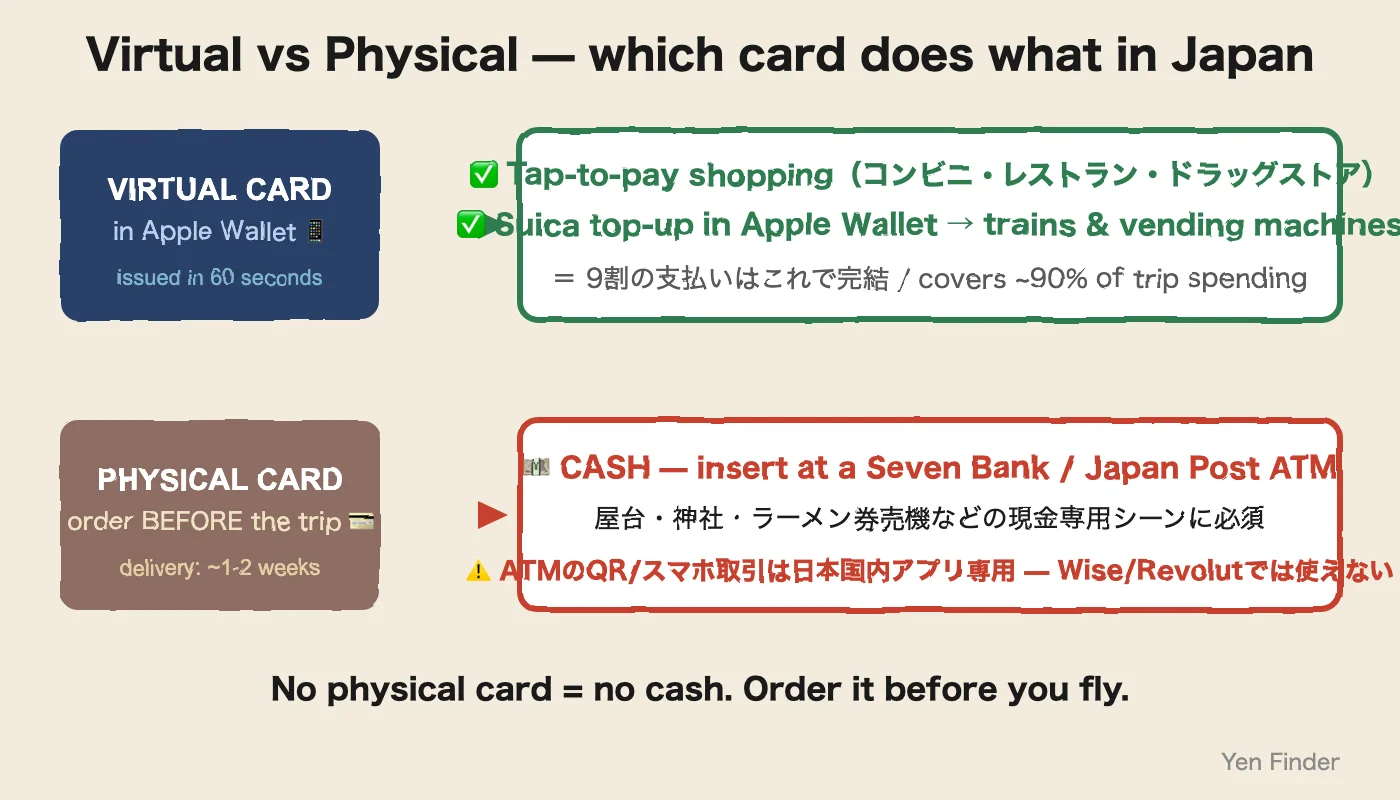
⚡ 30-Second Answer: Wise virtual card × Apple Pay = the strongest digital payment for Japan travel — instant issue, tap-to-pay everywhere, Suica top-ups at mid-market −0.5%. But it cannot pull cash from a Japanese ATM: the "Smartphone"/QR menu is for Japanese domestic apps only, and foreign cards need the physical card inserted.Order the plastic 1-2 weeks before you fly — cash-only Japan (stalls, shrines, ticket machines) is real.
Quick Reference
Value
Virtual card
Apple Pay shopping + Suica
Cash at ATMs
Physical card ONLY
QR "Smartphone" ATM
JP domestic apps only
ATM fee
¥0 to ¥30K/mo + machine ¥110-220
Physical card
Order BEFORE the trip
Last verified
June 2026
✓ Last verified: Aug 2026
📖9 min read
Yen Finder Editorial
SponsoredThis article contains affiliate links. We may earn a commission when you sign up through them, but our recommendations and editorial stance are not influenced by the partnerships.
Contents📖 ~10 min read
With Wise you can sign up, issue a virtual card in 5 minutes, and be tapping your phone at a konbini within 30 minutes — that covers shopping and Suica top-ups, roughly 90% of trip spending. What the virtual card cannot do is cash: Japanese ATMs dispense to foreign cards only via the physical card slot, and the plastic takes 7-14 business days by mail. So the honest sequencing is: order the physical card 2 weeks before departure, set up the virtual card the same day. This page walks all four steps: KYC → card issue → wallet add → and cash done right.
TL;DR — the 5-minute summary
Wise virtual card: issued instantly (¥0) after identity verification; usable within 30 minutes of account opening
Apple Pay / Google Pay add: an "Add to Apple Wallet" button appears right after the virtual number is issued — one tap
Cash at ATMs: physical card required — the "Smartphone"/QR menu on Seven Bank ATMs only works with Japanese domestic apps (PayPay etc.), not Wise
Daily limits: on a free Wise account, ¥300,000 equivalent/day; ATM cap ¥100,000 per transaction
Fees: virtual issue ¥0; ATM withdrawals free up to ¥30,000/month; over that, 1.75% + ¥0.50/withdrawal
Do you still need the physical card?: mostly no, but festival food stalls, old ticket machines, and some rural taxis don't take NFC tap — physical card or cash is safer there
Problems this page solves
Typical traveler pain points:
"My physical card didn't arrive in time" → how do I pay during the trip?
"I installed the Wise app, but I'm not sure I can actually pull cash from an ATM"
"I added it to Apple Pay, but does it really work at Japanese convenience stores?"
"The 1.75% ATM fee sounds expensive — how do I avoid it?"
→ This article breaks it into 4 steps + failure modes + workarounds.
Step 1: Open a Wise account + KYC (10–15 minutes)
1-1. Sign up (3 minutes)
Go to the Wise official site and sign up with an email. Pick your country of residence → choose Personal account.
No initial deposit is required. You can issue the virtual card with a zero balance (top up later, or let it pull from debit).
1-2. KYC (identity verification) — 5–10 minutes
What you need:
Passport (recommended, works internationally)
Selfie (to confirm you match the passport)
The mobile app is dramatically faster. Download the Wise app → "Verify your identity" → photograph your passport → scan your face (it will prompt you to move side-to-side and up-and-down).
Time: usually 3–10 minutes to approval. During peak times, up to 24 hours.
Common failure: passport page glare blocking the read → avoid direct fluorescent light, lay the passport flat and shoot straight down.
1-3. Top up (optional, recommended before departure)
The standard move is send yen via domestic bank transfer → convert to USD or your home currency inside Wise. But the virtual card can be issued with zero balance, so if you're in a rush, skip this and move on.
Step 2: Issue the virtual card (1 minute)
After KYC clears, in the app go to "Card" tab → "Get a card".
You'll see three options:
Type
Issue time
Cost
Physical card shipped
Virtual card (Free)
Instant
¥0
No
Virtual card (Premium)
Instant
¥1,500/month
No, but unlimited free ATM
Physical card
7–14 business days
¥1,200 issue fee
Yes
→ Pick "Virtual card (Free)" → set a 4-digit PIN → done.
Card number, expiry, and CVV show up immediately. That's enough to pay online.
One number to remember: the 7–14 days before the physical card arrives — all of it is covered by virtual card + mobile NFC.
Step 3: Add it to Apple Pay / Google Pay (2 minutes)
On iPhone (Apple Pay)
Right after the virtual card is issued, an "Add to Apple Wallet" button appears. Tap it.
Apple Wallet launches automatically
"Next" → accept the terms
Biometric auth (Face ID or Touch ID)
Added (about 10 seconds)
Tip: When you add the Wise virtual card to Apple Wallet, the Wise app issues a separate "device account number" for Apple Pay. That means the merchant terminal never sees the real card number = stronger security.
On Android (Google Pay)
Same idea — in the Wise app, "Card" → "Add to Google Wallet".
Common failure: if the "Add to Google Wallet" button doesn't show → check that Google Wallet is installed in your phone settings. On some country-specific Android builds Google Pay is restricted — in that case you'll have to wait for the physical card.
⚠️ Don't tap the Wise card at train gates. Most Japanese rail gates don't accept Visa/Mastercard tap — you'll get an error with a queue forming behind you. The right move: create a digital Suica inside Apple Wallet and use Wise as its top-up card. Trains, buses and vending machines all run on the Suica.
Step 4: Cash needs the PHYSICAL card — the part most guides get wrong
Time to correct a myth that this page itself once spread: you cannot
withdraw cash at a Japanese ATM with the Wise app, a QR code, or your
phone's NFC. Seven Bank ATMs do show a "Smartphone"
(スマートフォンでの取引) button — but that menu works only with
Japanese domestic apps (PayPay, au PAY, Japanese bank apps).
Foreign-issued Wise and Revolut cards are not on the list.
4-1. The flow that actually works
Order the physical Wise card before your trip (7-14 business
days by mail — it cannot be rushed from a hotel in Japan)
In Japan, find a Seven Bank ATM (inside any 7-Eleven, 24/7) or
a Japan Post ATM
Insert the physical card → the English menu appears
automatically for foreign cards
Wise → ATM withdrawal (a region-based monthly allowance (US $250 / JP ¥25,000 / EU €250))
¥0 (first 2 free)
Over ¥30,000/month
1.75% + ¥0.50/withdrawal
Seven Bank ATM operator fee
¥220 per withdrawal
FX (USD → JPY conversion)
0.40–0.65% (mid-market + spread)
Example: pulling $100 (about ¥15,000) once costs ¥0 from Wise + ¥220 from Seven Bank = ¥220 total. Stay under 2 pulls/month and it stays this cheap.
Number to remember: Wise charges 1.75% on Japanese ATM withdrawals once you exceed ¥30,000/month. If you'll go over, #137 best travel cards has alternatives you can pair with Wise.
When you really do need the physical card (or cash)
Virtual + Apple Pay handles almost everything, but the following situations still need a physical card or cash:
Situation
Why
What to do
Food stalls (festivals, summer matsuri)
No NFC terminal at all
Cash
Old ticket machines (small ramen-shop meal-ticket machines, etc.)
→ Bottom line: pull ¥10,000–¥20,000 in cash from an ATM and you can clear all of the above.
Timeline: from 7 days before departure to landing day
When
What
7 days before
Sign up for Wise, finish KYC, top up a test ¥5,000
5 days before
Issue virtual card, add to Apple Wallet
3 days before
Test transaction (¥100 tap at a domestic convenience store)
1 day before
Convert your home-currency balance to USD (inside Wise)
30 minutes after landing
Pull ¥10,000 from a Seven Bank ATM (minimum cash buffer)
During the trip
Apple Pay for convenience stores and cafés; cash for food stalls and small shops
Troubleshooting
Q: ATM says "card cannot be used"
A: Check that the card isn't frozen in the Wise app. Overseas use sometimes trips the fraud system and freezes the card. Unfreeze via Card → ⋯ → Unfreeze in the app.
Q: Apple Wallet won't add the card
A: Check your iOS version (16.0+ recommended). Older iPhones (iPhone 7 and below) don't support FeliCa.
Q: The virtual card number isn't showing on screen
A: In-app, tap Card → "Show card details" to bring it back.
Q: Does the physical card have the same number?
A: No. Wise's physical card has its own independent number from the virtual one. If you have both, they're treated as separate cards.
Q: Does Revolut do the same thing?
A: Yes. Revolut follows the same flow — instant virtual card → Apple Pay → ATM withdrawal. Details: #15 Wise vs Revolut vs bank card
Common misconceptions
Myth 1: "Virtual cards only work for online payments"
→ No. Add it to Apple Wallet / Google Wallet and you can tap it at in-person NFC terminals.
Myth 2: "You need the physical card to pull cash from Seven Bank ATMs"
→ True — and worth repeating. The ATM's Smartphone/QR menu only serves Japanese domestic apps; foreign Wise cards withdraw by inserting the physical card. Order it before you fly.
Myth 3: "Wise has high overseas fees"
→ Not really. Wise's FX is 0.40–0.65%, vastly cheaper than the 2–3% on a typical bank card. ATM withdrawals are free up to a region-based monthly allowance (US $250 / JP ¥25,000 / EU €250).
Myth 4: "Japan is so cash-heavy you must carry cash"
→ Misleading for big cities. In the major tourist areas of Tokyo, Osaka, Fukuoka, and Sapporo, 80–95% of merchants take cards or mobile payment. Only rural areas, food stalls, and small owner-operated shops require cash.