Revolut in Japan with Apple Pay (2026): Virtual Card Setup, Where It Works, ATM Pitfalls
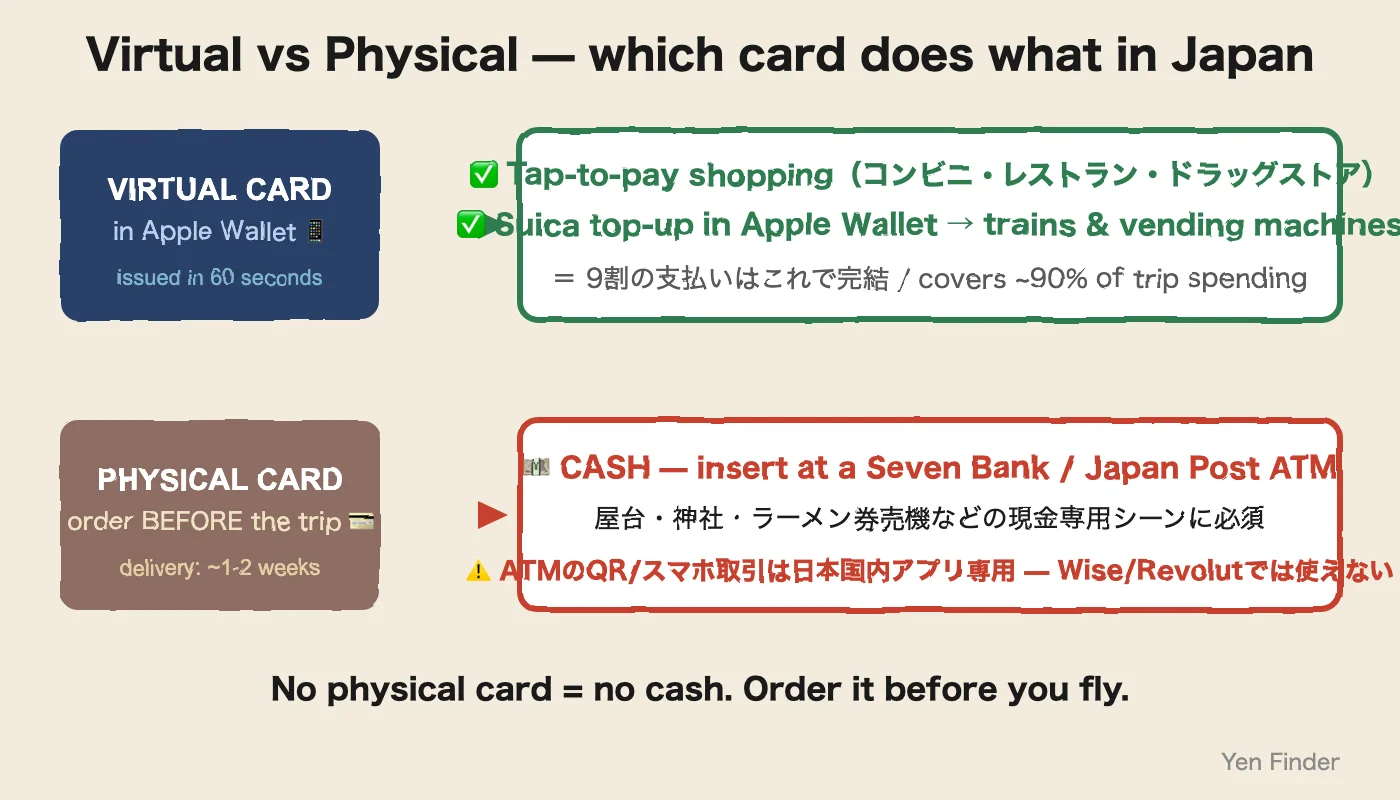
⚡ 30-Second Answer: Revolut virtual card × Apple Pay covers shopping + Suica top-ups — issued in 60 seconds, 0% weekday FX. But it cannot pull cash from a Japanese ATM: the QR/"Smartphone" option on Seven Bank ATMs is for Japanese domestic apps only.Order the physical card before you fly — cash (stalls, shrines, ramen ticket machines) requires inserting it. Disposable virtual cards remain the best anti-skimming defense for online bookings.
Quick Reference
Value
Virtual card
Apple Pay shopping + Suica
Cash at ATMs
Physical card ONLY
QR "Smartphone" ATM
JP domestic apps only
Weekday FX
0% (Standard)
vs Wise
Weekday trip = Revolut
Last verified
August 2026
✓ Last verified: Aug 2026
📖7 min read
Yen Finder Editorial
SponsoredThis article contains affiliate links. We may earn a commission when you sign up through them, but our recommendations and editorial stance are not influenced by the partnerships.
Contents📖 ~8 min read
Revolut takes you from KYC → virtual card in 60 seconds → added to Apple Wallet, all on the phone — and that covers tap-to-pay shopping and Suica top-ups, which is ~90% of trip spending. What it does NOT cover is cash: Japanese ATMs only dispense to foreign cards via the physical card slot, so order the plastic before you fly. Key differences vs Wise: disposable virtual cards in unlimited quantity, and 0% weekday FX (Standard plan; +1% on weekends — Premium and above are exempt).
TL;DR — The Revolut bottom line
Virtual card issue: instant, ¥0 after KYC, 60 seconds
Disposable virtual: auto-rotates after each charge, strong anti-phishing
Add to Apple Pay: one tap on "Add to Apple Wallet" inside the app
Cash at ATMs: physical card required — the QR/"Smartphone" ATM menu is for Japanese domestic apps (PayPay etc.), not Revolut or Wise
FX: 0% on weekdays (mid-market) / +1% on weekends (weekend premium)
ATM cap: free up to roughly €200/month (about ¥32,000), 2% above that
When to pick which: short trip = Revolut wins on FX; long stay = Wise wins on larger free ATM allowance
Who this page is for
A Revolut-specific walkthrough you can read alongside the Wise version (#184). Focused on the Revolut-specific gotchas:
The "0% on weekdays" trap (it isn't 24/7/365)
How to actually use the disposable virtual card in physical stores
Why the monthly free ATM allowance is smaller than Wise's
Whether to leave crypto and stock trading on or off
Step 1: Open a Revolut account + KYC (10 min)
1-1. Sign up
Download the app from Revolut official. Start with phone number + SMS verification.
Plan options:
Plan
Monthly
Free ATM
Free FX
Standard
¥0
¥32,000/mo
¥160,000/mo (weekdays)
Plus
¥390
¥40,000
unlimited (weekdays)
Premium
¥980
¥64,000
unlimited (24h)
Metal
¥1,800
¥128,000
unlimited + cashback
→ Standard is enough for tourists. ¥30,000 of ATM withdrawals covers a 1-2 week stay.
1-2. KYC (identity check)
Passport (recommended)
Selfie (auto-capture in the app)
Usually approved in 5-15 minutes
Common failure: "Address verification" sometimes asks for a utility bill or similar. If you have a Japanese address, snap a photo in advance — it speeds things up.
Disposable virtual card — auto-regenerates after each charge, best anti-phishing
Physical card — mailed in 7-14 days, ¥1,000 to issue
→ The standard play is to pick "Virtual card" and add it to Apple Pay. Disposable cards can't be added to Apple Pay, so keep one separately for online checkouts (Amazon Japan, Booking.com, etc.) — extra security.
2-1. Showing the number
Right after issue, card number, expiry, and CVV appear in the app. Tap "Show details".
Step 3: Add to Apple Pay (30 sec)
On the card detail screen, tap "Add to Apple Wallet".
Apple Wallet launches
Accept the terms → Face ID
Done
Difference vs Wise: right after the card is added, Revolut pops up "Now you can pay with your phone" with a short video tutorial — easier for first-time tourists.
⚠️ Don't tap the Revolut card at train gates. Most Japanese rail gates don't take Visa/Mastercard tap — you'll just get an error and a queue behind you. The right move: create a digital Suica inside Apple Wallet, and use Revolut as its top-up card. Trains, buses and vending machines all run on the Suica.
Step 4: Cash needs the PHYSICAL card — the part most guides get wrong
Let's kill a myth you'll read elsewhere (an earlier version of this
page included): you cannot withdraw cash at a Japanese ATM with the
Revolut app or a QR code. Seven Bank ATMs do show a "Smartphone"
(スマートフォンでの取引) button — but that menu only works with
Japanese domestic apps (PayPay, au PAY, Japanese bank apps).
Foreign-issued Revolut and Wise cards are not on that list, and
tapping the phone's NFC at the ATM doesn't work either.
4-1. The flow that actually works
Order the physical Revolut card before your trip (delivery
typically 1-2 weeks — this is the step you can't do from a Tokyo
hotel room)
In Japan, find a Seven Bank ATM (inside any 7-Eleven) or a
Japan Post ATM
Insert the physical card → English menu appears automatically
for foreign cards
No physical card and already in Japan? Your realistic options are
a counter exchange with foreign cash (Shinjuku guide)
or surviving cashless — doable in central Tokyo, painful at shrines
and ramen ticket machines.
4-2. The real cost of ATM use
Item
Fee
Revolut side (up to ¥32,000/mo)
¥0 (first 5 withdrawals free)
Over ¥32,000/month
2.0% (min ¥0.50 per withdrawal)
Weekday FX
0% (mid-market)
Weekend FX
+1% (weekend premium)
Seven Bank side
¥220
The number to remember: exchanging or withdrawing on a Saturday or Sunday costs you an extra 1% on Revolut. The fix: pull out a larger amount Friday daytime.
4-3. Comparison with Wise
Item
Wise
Revolut
Instant virtual issue
Yes
Yes
Apple Pay support
Yes
Yes
Free ATM per month
¥30,000
¥32,000 (Standard)
FX fee
0.40-0.65% (24h)
0% (weekdays) / 1% (weekends)
When physical card matters
Convenience-store ATMs, taxis
Same
Japanese support
Yes
Yes
Verdict: weekday-heavy trip = Revolut wins on FX; weekend-heavy or longer stay = Wise is steadier.
A: In the Revolut app, Cards → Settings → toggle "Online transactions", "Contactless", and "ATM withdrawals" ON. They're sometimes off by default for overseas use.
Q: Apple Pay stays "pending" after adding
A: Wallet sometimes asks to "Verify with bank". Revolut sends a 6-digit SMS code — enter it.
Q: I need to exchange on the weekend without paying the 1%
A: Convert what you'll need inside the app on Friday (the markup applies Fri 17:00 – Sun 18:00 ET), then spend from the converted JPY balance over the weekend. On Premium/Metal/Ultra the weekend markup doesn't apply at all — Standard pays 1%, Plus 0.5%.
Q: Can I use Apple Pay or Revolut at JR green ticket machines (みどりの券売機)?
A: No — not by tapping. As of 2026, JR's green/purple ticket machines and station gates do not accept Apple Pay, contactless ("tap-to-pay"), or QR codes — per JR East's own FAQ. They take physical credit/debit cards by insertion (Visa, Mastercard, JCB, Amex). So to buy a Shinkansen or reserved-seat ticket at the machine, insert your physical Revolut or Wise card — the Apple Pay virtual card won't work there. For ordinary trains, buses and vending machines, skip the ticket machine entirely: load a digital Suica into Apple Wallet and tap that (it tops up from your Revolut card). A Kanto-area contactless rollout is starting in 2026, but JR's ticket machines are not part of it yet.
Common misunderstandings
Myth 1: "Revolut doesn't work in Japan"
→ False — but know the split: the physical card works at 7-Eleven, Lawson and FamilyMart ATMs for cash, and the virtual card via Apple Pay taps at convenience stores and cafés (for trains, charge a Suica — gates don't take card tap).
Myth 2: "Revolut Standard isn't really free"
→ Depends on use. Up to ¥32,000/mo of ATM is free and weekday FX is 0%, so a standard 1-2 week trip can run at ¥0 total.
Myth 3: "Disposable virtual = always thrown away"
→ No. Only the number rotates after each charge — your Revolut balance stays the same.